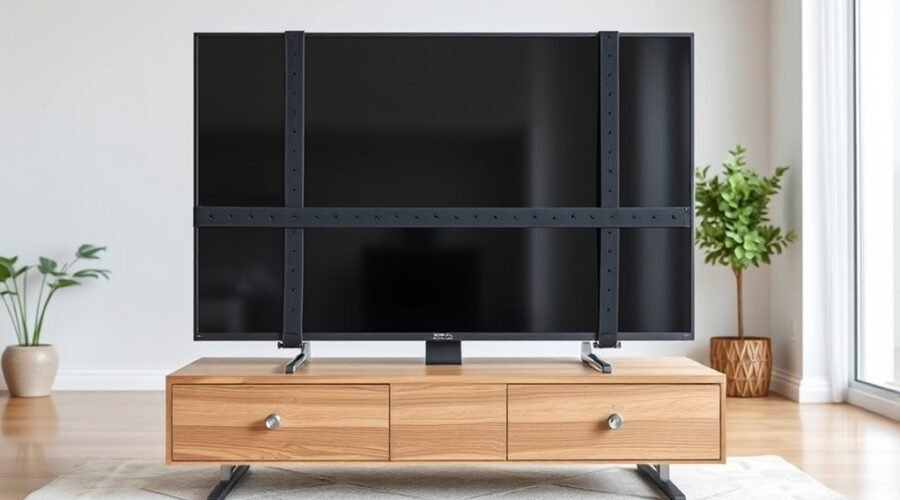
A television can tip even when it looks stable, especially if it sits on unsuitable furniture, is positioned near the front edge, or can be pulled by a child, pet, or loose cable. The safest setup combines a TV stand designed for the set, correct positioning, and a purpose-built anti-tip restraint installed according to the TV and restraint manufacturers’ instructions.
Quick Answer
To secure a TV to a stand, place it on stable furniture designed for its size and weight, keep the entire base supported and pushed back, then attach a compatible anti-tip strap to approved mounting points on the TV and to a solid wall or structural part of the furniture. Follow the TV and restraint-kit instructions exactly.
Key Takeaways
- Use a sturdy, level TV stand or media center designed to support the television’s size, weight, and footprint.
- Keep every TV foot or the entire pedestal base fully supported, with no overhang, and position the TV toward the back of the stand.
- Use a purpose-built anti-tip restraint and follow the TV and restraint-kit instructions for mounting points, screws, spacers, anchors, and allowable surfaces.
- Anchor the TV and, when appropriate, the furniture itself; keep cords and climb-attracting objects out of children’s reach.
- Recheck straps, fasteners, furniture stability, and cable routing after moving, cleaning, or rearranging the setup.
At a Glance
| Time Required | About 15–30 minutes for a straightforward strap installation; more time may be needed for wall anchoring or furniture preparation. |
| Difficulty | Easy to moderate, depending on the wall, stand construction, and restraint system. |
| Tools Needed | Compatible anti-tip kit, screwdriver, measuring tape, and the TV’s manual; a stud finder and drill may be needed for an approved wall installation. |
| Cost | Usually low for a basic restraint kit; cost varies with the hardware, wall type, furniture, and whether professional installation is needed. |
Warning: Never guess at VESA screw length, drill into an unknown part of a TV cabinet, or attach a restraint to glass, thin decorative backing, loose trim, or another weak surface. Incorrect hardware can damage the television or fail during a tip-over. Follow the exact TV and restraint-kit instructions.
How to Secure a TV to a Stand
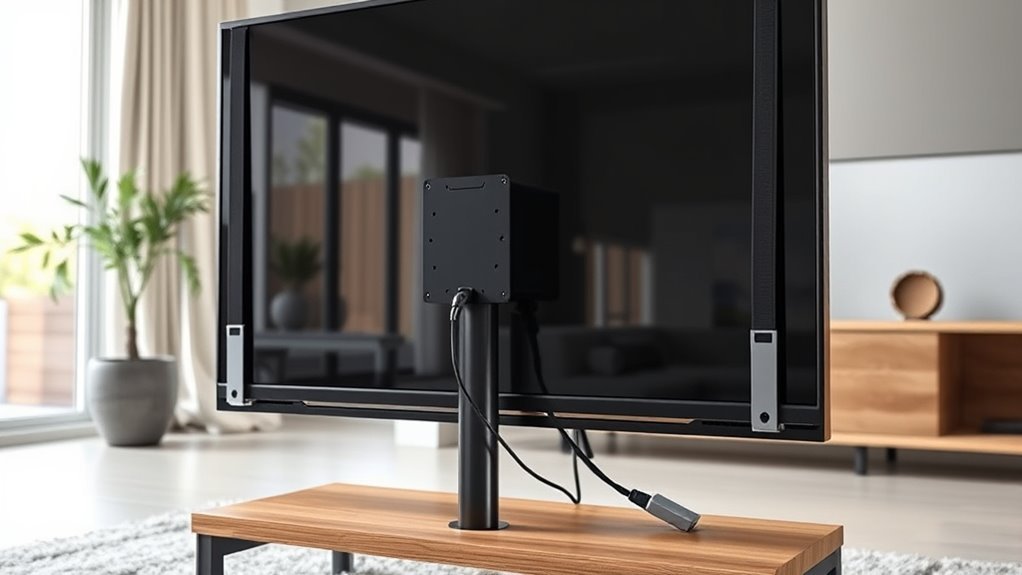
Start with the furniture. The U.S. Consumer Product Safety Commission’s Anchor It! guidance recommends placing televisions only on furniture designed to hold a TV, such as a TV stand or media center. Check the furniture manufacturer’s weight and size limits and make sure the stand sits level without rocking.
Place the TV so every foot or the entire pedestal base rests fully on the stand. There should be no front, side, or rear overhang. Push the TV toward the back while maintaining any ventilation clearances required by its manufacturer.
CPSC advises anchoring TVs and furniture to the wall. If anchoring is not possible, use a sturdy, low base, push the TV as far back as practical, and keep cables and tempting objects out of reach.
Next, install a purpose-built TV anti-tip strap, cable, or bracket system. The restraint should be compatible with your television and with the surface to which it will be attached. Many flat-screen TVs have threaded rear mounting points that can accept compatible restraint hardware, but you should verify this in the TV manual before installation.
Attach the TV side of the restraint using the specified screws, washers, spacers, and mounting locations. Attach the opposite end to the wall or to a structural part of the furniture only when the restraint manufacturer approves that installation method.
Adjust the restraint to remove unnecessary slack without pulling the TV off center or placing continuous bending force on its cabinet. Check that all fasteners are seated correctly, then route cords so they cannot be used as pull points.
For homes with children, keep toys, remotes, game controllers, snacks, and other attractive objects off the top of the TV and upper shelves. CPSC specifically recommends removing objects that may encourage a child to climb.
Before You Start: Check the TV, Stand, and Anchor Points
Before opening the restraint kit, confirm that the entire setup is suitable for securing. Check the TV manual for its weight, base dimensions, approved mounting holes, required screw specifications, and any restrictions on using those mounting points.
Then inspect the stand. It should be wide enough to support the full TV base, strong enough for the TV’s weight, and free from wobble, loose joints, cracked panels, or bowed shelves. A strap cannot turn unstable furniture into a safe foundation.
- TV: confirm weight, base footprint, mounting pattern, screw diameter, screw length, spacers, and any manufacturer warnings.
- Stand: confirm rated capacity, full base support, level placement, and structural condition.
- Restraint: confirm compatibility with the TV weight and the intended wall or furniture attachment method.
- Wall: identify the wall construction and the attachment method approved by the restraint manufacturer.
- Work area: unplug the TV when required and have another adult help if the screen is large, awkward, or difficult to support safely.
Pro Tip: Photograph the TV’s model label before moving it into position. You can use the exact model number to find the manufacturer’s manual and confirm the required VESA pattern, screw dimensions, spacers, and installation restrictions before attaching anything.
How TV Safety Straps Prevent Tip-Overs
TV safety straps help prevent tip-overs by creating a restraint between the television and a wall or approved furniture attachment point. If the TV is bumped or pulled, the restraint limits how far it can move forward.
This is especially important in homes with children. CPSC’s Anchor It! campaign identifies unsecured TVs and furniture as a hidden household hazard and recommends securing televisions even when they are not wall-mounted.
- Limit forward movement if the screen is bumped or pulled.
- Keep the TV connected to a more stable wall or approved furniture anchor point.
- Reduce reliance on the TV’s own feet or pedestal for tip-over resistance.
- Provide a visible component that can be inspected for damage, slack, or loose hardware.
A restraint should not be treated as permission to use an undersized, unstable, or damaged stand. The stand and restraint work together as parts of the same safety system.
CPSC’s latest published annual tip-over report, released in February 2024, estimated an annual average of 17,800 emergency-department-treated injuries from furniture, television, and appliance tip-over incidents during 2020–2022. Children under 18 accounted for 44% of those injuries. The figure covers the combined product categories, not televisions alone.
Choose the Right TV Safety Strap
Choose a purpose-built TV anti-tip kit whose instructions specifically allow your intended installation method. Do not judge a restraint only by whether a connector is metal or plastic; the important factors are the complete system’s stated capacity, compatible TV mounting points, supplied hardware, installation surfaces, and manufacturer instructions.
| Feature | What to check |
|---|---|
| Capacity | The kit is suitable for the TV’s weight and intended use |
| TV connection | Compatible with the approved threaded mounting points on your TV |
| Hardware | Correct screws, washers, spacers, anchors, and brackets for the installation |
| Attachment surface | Approved for your wall construction or structural furniture component |
| Adjustment | Allows excess slack to be removed without pulling the TV out of alignment |
If the kit uses the TV’s VESA mounting area, check the exact TV model before selecting screws. Samsung’s current wall-mount guidance, for example, tells owners to consult the manual for model-specific information because mounting patterns and hardware requirements vary.
Replace a restraint if the webbing is cut or frayed, a cable is kinked or damaged, a bracket is bent, a fastener no longer holds securely, or an adjustment buckle will not maintain its setting.
Compare Wall Anchors and C-Clamps
A wall attachment and a furniture-mounted clamp serve the same general purpose—providing an anchor point—but they are not interchangeable in every installation.
A wall connection can provide a direct structural restraint when installed using the method specified for the wall type. A clamp or furniture attachment can be useful when the anti-tip kit specifically permits attachment to the stand, but its allowable furniture thickness, shape, material, and load are product-specific. There is no universal clamp-thickness limit that applies to every TV restraint.
Use the attachment method approved by the restraint manufacturer for your exact wall or furniture construction; do not improvise a clamp, hook, or fastener simply because it appears to fit.
- Use wall attachment when the restraint instructions call for structural wall anchoring and you can reach a suitable attachment point.
- Use a furniture clamp only when the clamp manufacturer approves the stand’s material, thickness, shape, and structural location.
- Do not clamp to glass, loose shelves, thin decorative panels, unsupported trim, or weak backer boards.
- If both the TV and furniture need restraint, secure each component according to its own instructions rather than assuming one strap automatically stabilizes everything.
If you rent, check the property rules before drilling. If wall attachment is not permitted, CPSC advises using a sturdy, low TV base, pushing the television back as far as practical, and keeping cords and climb-attracting objects out of reach. A furniture-mounted restraint may also be an option when the kit specifically allows it.
Install the Strap on VESA Holes
Locate the threaded mounting holes on the rear of the TV. These are commonly associated with the VESA Flat Display Mounting Interface, but the pattern, thread diameter, usable screw length, spacers, and installation restrictions vary by television.
Do not choose a screw only because it happens to thread into the hole. Check the TV manual and the anti-tip kit instructions for the exact hardware combination. A screw that is too short may not provide adequate engagement, while one that is too long can bottom out or damage the television.
Align the restraint bracket or reinforced strap eye with the approved mounting point. Add the specified washer or spacer, then start the screw by hand so it threads correctly.
Tighten it until the bracket is secure according to the manufacturer’s instructions. Do not continue tightening simply to make the connection “extra tight,” because overtightening can damage threads, spacers, brackets, or the TV cabinet.
Repeat the process for the other required attachment points. If the anti-tip kit uses two straps or two TV-side brackets, install both unless its instructions specifically state otherwise.
Once attached, visually confirm that each bracket sits correctly and that no cable, plastic trim, or vent is pinched by the hardware.
Attach the Strap to the Wall or Stand
Connect the opposite end of the anti-tip restraint to the wall or to an approved structural part of the stand. The correct attachment depends on the restraint kit, wall material, and furniture construction.
Avoid attaching to a surface merely because it is convenient. The anchor point needs to be one the restraint manufacturer identifies as suitable for carrying the expected load.
Wall Anchor Setup
For a wall installation, identify the wall construction first. If the restraint instructions require a wood stud, use a stud finder to locate it and install the specified fastener into the stud. If the manufacturer approves masonry or another wall substrate, use the hardware and drilling method listed for that material.
Do not assume that a generic hollow-wall anchor is acceptable just because the wall surface is drywall. The restraint manufacturer’s instructions should determine whether a particular anchor or structural attachment is allowed.
- Locate the approved structural attachment point.
- Use the screw, anchor, washer, and pilot-hole dimensions specified for that wall type.
- Keep the restraint positioned so it limits forward movement without forcing the TV sideways.
- Recheck the attachment after moving either the television or stand.
A wall restraint does not replace the need for a stable stand. The TV should still sit fully supported on furniture designed for television use.
Clamp Mounting Option
A clamp can provide a furniture attachment point when it is part of a restraint system specifically designed for that method. Before using one, verify the allowable furniture material, thickness range, clamp orientation, and load limits stated by the manufacturer.
Position the clamp on a structural rail, frame member, or other approved solid component. Do not place it on glass, a thin fiberboard back panel, decorative molding, or a shelf that can move independently of the stand.
Tighten the clamp according to its instructions. Excessive force can crush or damage some furniture materials, while insufficient force can allow the clamp to slide.
After installation, make sure the clamp cannot rotate, walk along the furniture edge, or release when the restraint is placed under light tension.
Adjust Strap Tightness
Remove excess slack from the anti-tip strap so the television cannot move far enough forward to approach the front edge of the stand. The strap should not pull the TV backward, tilt it, twist its frame, or place continuous side load on the mounting screws.
- Keep both sides evenly adjusted when using a two-strap system.
- Make sure the straps do not cross sharp furniture edges that can abrade them.
- Keep power and signal cables separate from the restraint so cable movement does not loosen it.
- Follow the restraint manufacturer’s tensioning method rather than creating knots or improvised extensions unless specifically permitted.
If the TV shifts out of alignment as the restraint is tightened, stop and correct the anchor position rather than forcing the strap tighter.
Keep the TV Set Back From the Edge
Keep the television toward the rear of the stand with its feet or pedestal fully supported. CPSC has repeatedly recommended pushing a TV as far back as practical on sturdy furniture to reduce tip-over risk.
Check the TV manufacturer’s ventilation requirements before placing the screen extremely close to a wall or cabinet. Safe setback does not mean blocking vents or ignoring required clearance.
The TV should remain centered from side to side unless the stand and TV manufacturer specify a different arrangement. No foot, pedestal edge, or portion of the base should hang beyond the supporting surface.
After positioning the TV, install the restraint and verify that moving cables or rotating a swivel base cannot pull the television toward the front edge.
Stabilize the Furniture and Balance the Load
The TV stand needs to remain stable before and after the television is added. Place it on a level surface and correct any rocking according to the furniture manufacturer’s instructions.
Keep heavier items on lower shelves or in lower cabinets where practical. Avoid loading one side of the stand heavily while leaving the opposite side empty.
- Do not exceed the stand’s stated shelf or total weight limits.
- Avoid narrow, shallow, damaged, or visibly flexible furniture.
- Tighten loose furniture fasteners according to the stand manufacturer’s instructions.
- Anchor the furniture itself when required or recommended for that product.
CPSC advises using furniture designed to hold televisions rather than placing a TV on an unsuitable dresser, chest, or improvised surface.
When Wall Mounting May Be the Safer Choice
Consider a properly installed wall mount when the existing stand is too narrow, cannot support the full TV base, has a low weight capacity, rocks even after adjustment, or does not provide a suitable structural point for an approved restraint.
Wall mounting can also remove the television from a climbable furniture surface, but the mount itself must be compatible with the TV and correctly fastened to the wall structure. Follow the mount and television manufacturers’ instructions, and use a qualified installer if you are unsure about the wall construction or safe lifting procedure.
Even after wall mounting the TV, any tall or tip-prone furniture below it may still need to be anchored independently.
Manage Cords and Remove Tempting Items
Route power, HDMI, antenna, network, and other cables so they cannot be pulled easily. A cable should not become a handle that transfers a tug directly to the TV.
Remove toys, remotes, game controllers, snacks, decorations, and other tempting items from the top of the TV and high furniture surfaces where children may try to climb to reach them.
Tidy Cord Routing
Use suitable clips, ties, channels, or cord covers to guide cables behind the television and stand. Leave enough slack for normal connections or an approved swivel mechanism, but do not leave long loops hanging within reach.
- Route cables along the rear of the stand where possible.
- Keep cords away from sharp edges and moving mount components.
- Do not cinch cable ties so tightly that they damage insulation.
- Replace frayed, crushed, or damaged power cords instead of hiding them in a cable bundle.
Keep cable routing separate from the anti-tip restraint. The safety strap should not depend on power or signal cables for support.
Hide Enticing Objects
Store remote controls, toys, controllers, and snacks in a low drawer, closed cabinet, or another location that does not encourage a child to climb the TV stand.
CPSC specifically warns against placing appealing objects where children may try to climb to reach them. Keeping the top of the stand clear improves both visibility and safety.
If the TV is wall-mounted, continue securing the cables so children cannot pull them or use them to climb.
Keep Hazards Out Of Reach
Check the area from a child’s height. Cords, loose shelves, remotes, decorative items, and reachable equipment can all encourage grabbing or climbing.
- Secure loose cords and keep plugs inaccessible where practical.
- Remove climb-attracting items from the TV area.
- Keep heavy objects on lower shelves.
- Anchor the television and furniture as directed for each product.
A tidy setup does not replace anchoring, but it removes several common ways a television or stand can be pulled or climbed on.
Common TV Anti-Tip Installation Mistakes
- Guessing the screw length: a screw can have the correct diameter and still be too long or too short for the television.
- Anchoring to a weak panel: thin backer board, decorative trim, glass, or a movable shelf may not be a structural attachment point.
- Using an unrated substitute: ordinary cord, tape, or an improvised fastener should not replace a purpose-built restraint.
- Leaving too much slack: a restraint that allows substantial forward travel may not stop the TV before it reaches the edge.
- Overtightening: excessive tension can pull the television out of alignment or damage mounting threads and furniture.
- Securing only the TV when the furniture is unstable: the stand itself may also require anchoring.
- Forgetting the setup after installation: cleaning, moving furniture, reconnecting cables, and renovations can loosen or relocate safety hardware.
Test the Setup and Check It Regularly
After installation, visually inspect every connection. Confirm that the television base remains fully supported, the stand does not rock, the restraint has no excessive slack, and the wall or furniture attachment has not shifted.
With another adult ready to support the television if necessary, make only a light stability check. Do not deliberately yank the screen forward or reproduce a tip-over load to “test” the restraint.
Keep the TV base fully supported, position the screen toward the back of the stand, and maintain the restraint so it limits forward movement without forcing the television out of alignment.
Inspect the straps and hardware periodically and whenever you move the TV, move the furniture, clean behind the stand, alter cable routing, or notice new movement.
Look for frayed webbing, damaged cable, bent brackets, loose screws, shifting clamps, stripped furniture holes, cracks, or a wall fastener that no longer feels secure. Replace damaged parts rather than attempting a makeshift repair.
Frequently Asked Questions
How to Prevent TV Stand From Tipping Over?
Use a stable TV stand designed for the television, keep heavier items on lower shelves, and do not overload the furniture. Anchor the stand to the wall when its manufacturer or applicable safety instructions call for anchoring. Keep children from climbing the stand and remove toys, remotes, and other attractive objects from upper shelves.
How Can I Prevent My TV From Tipping Over?
Place the TV on furniture designed for its size and weight, keep the entire base supported and pushed toward the rear, and install a compatible anti-tip restraint according to the TV and restraint manufacturers’ instructions. CPSC recommends anchoring TVs and furniture to the wall whenever possible and keeping cords and climb-attracting objects out of reach.
Is There a Way to Secure a TV to a TV Stand?
Yes. Many anti-tip systems can connect the TV’s approved rear mounting points to a structural part of the furniture or to the wall. Use only an attachment method allowed by the restraint manufacturer, and verify the exact TV mounting screws and spacers in the television manual. Do not attach a restraint to glass, thin back panels, loose shelves, or decorative trim.
How to Stop TV Mount From Tilting?
If a tabletop pedestal or replacement stand tilts, first verify that its brackets, base, spacers, and fasteners are installed exactly as the manufacturer specifies. If a wall mount tilts unexpectedly, check its adjustment and locking hardware according to the mount manual. An anti-tip strap is a safety restraint, not a substitute for repairing or correctly assembling a loose mount.
Can I Secure a TV Without Drilling Into the Wall?
Possibly. Some purpose-built anti-tip systems allow attachment to approved structural parts of the furniture, including compatible clamp systems. Follow the restraint manufacturer’s limits for furniture material, thickness, and attachment location. If wall anchoring cannot be done, CPSC also recommends using a sturdy, low TV base, pushing the TV back, and keeping cords and climb-attracting objects out of reach.
Can I Use Zip Ties Instead of a TV Anti-Tip Strap?
Use a restraint specifically designed and rated for securing a television rather than substituting ordinary cable ties, rope, tape, or other improvised materials. A purpose-built kit provides defined mounting hardware and installation instructions for the TV and its anchor point.
Conclusion
Securing a TV safely takes more than tightening a strap. Start with furniture designed for the television, keep the full TV base supported and set back from the edge, and use a purpose-built restraint installed with the exact hardware and attachment method specified by its manufacturer and the TV maker.
Keep cords and climb-attracting objects out of reach, anchor unstable furniture when required, and inspect the setup again after moving or cleaning it. If the stand cannot safely support the television or provide an approved restraint point, use a safer stand or a correctly installed wall mount instead.
Sources
- U.S. Consumer Product Safety Commission — Anchor It! — guidance on securing TVs and furniture, using suitable TV furniture, and removing climbing temptations.
- CPSC Anchor It! — What You’ll Need — TV restraint options and use of threaded rear mounting points.
- CPSC 2026 TV and Furniture Tip-Over Safety Reminder — current guidance on anchoring, sturdy low bases, cords, and climb-attracting objects.
- CPSC 2023 Annual Tip-Over Report — the latest published annual CPSC injury and fatality dataset identified by the agency’s current resources page.
- Samsung — Things to Consider Before Mounting Your TV — model-specific VESA and mounting-hardware guidance.
- VESA — Flat Display Mounting Interface Standard — background on standardized display mounting interfaces.