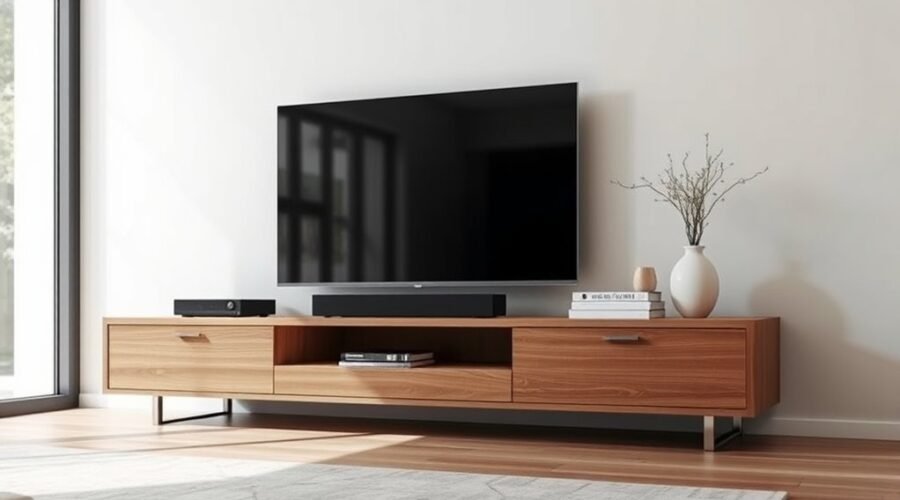
A media console is a low storage cabinet designed to organize a TV setup without making the room feel dominated by electronics. Depending on the design, it can hold a television, soundbar, streaming devices, game systems, remotes, cables, and décor. The right one combines useful storage with safe TV support, ventilation, cable access, and proportions that fit your room.
Quick Answer
A media console is furniture designed to support or sit beneath a TV while organizing media equipment, cables, games, and accessories. Compared with a basic open TV stand, it often provides more enclosed storage and a furniture-like appearance, although the terms “media console” and “TV stand” frequently overlap in stores.
Key Takeaways
Key Takeaways
- A media console combines TV or media-equipment support with shelves, drawers, cabinets, and cable management.
- “Media console” and “TV stand” are overlapping retail terms, so compare dimensions and features instead of relying on the label.
- For a stand-mounted TV, verify the actual TV width, foot or base spacing, console depth, and rated load before buying.
- Electronics need device-specific ventilation; closed cabinets should not block vents or trap heat.
- Solid wood, veneer, engineered wood, metal, and glass can all work well when construction and weight ratings suit your equipment.
- TV and furniture stability matters as much as style, especially in homes where children may climb on furniture.
What Is a Media Console?
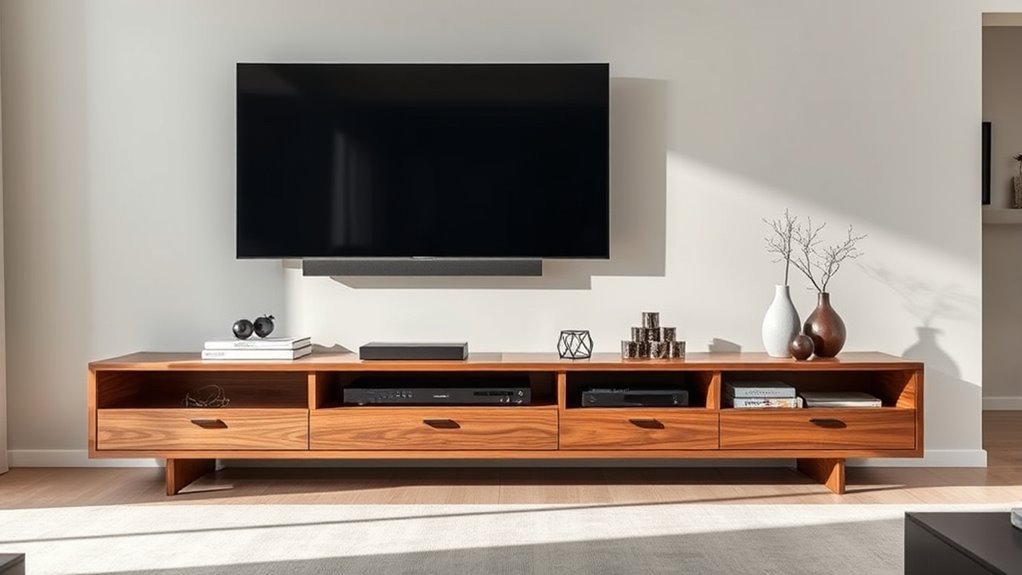
A media console is a versatile piece of furniture used to support or organize a home entertainment setup. It may hold the television itself or sit beneath a wall-mounted TV while providing space for audio-video equipment, game systems, remotes, media, and décor.
Most designs combine drawers, doors, shelves, or open compartments. Many also include rear cutouts or channels that make cable management easier. These features can keep frequently used equipment accessible while reducing visible cord and accessory clutter.
A useful media console does three jobs at once: it fits the TV safely, gives electronics enough room to operate, and stores the accessories you do not want scattered around the room.
Media consoles come in varied sizes, materials, and finishes, from warm wood cabinets to slim metal frames and glass-front storage. Some are designed specifically for electronics, while others resemble credenzas or sideboards.
There is no strict industry line separating every media console from every TV stand. Retailers often use “media console,” “TV stand,” “TV cabinet,” and “entertainment unit” for overlapping products. The more useful question is whether a particular piece has the dimensions, load capacity, ventilation, storage, and cable access your setup needs.
Compare Media Consoles and TV Stands
Both media consoles and TV stands can support televisions and entertainment equipment. A media console often suggests a longer, furniture-focused cabinet with more concealed storage, while a TV stand can range from a simple open frame to a fully enclosed cabinet. In practice, the names frequently overlap.
| Feature | Media Console | TV Stand | Credenza |
|---|---|---|---|
| Typical purpose | Media equipment plus storage | TV support and media equipment | General enclosed storage |
| Storage | Often drawers, doors, and shelves | Ranges from minimal to extensive | Usually cabinet-focused |
| Cable access | Common | Common on media-oriented models | May be absent |
| Best buying approach | Compare physical dimensions, rated load, ventilation, storage, and cable routing rather than choosing by name alone. | ||
If you want furniture that visually grounds a larger TV wall and hides controllers, cables, games, and accessories, a longer media console can be useful. If your setup is simple, a compact TV stand may provide everything you need without taking up as much wall space.
How Media Consoles Improve Storage
A media console can organize devices, games, remotes, controllers, chargers, and décor without forcing everything onto the top surface. Drawers and cabinets work well for small accessories, while adjustable shelving makes it easier to accommodate equipment of different heights.
Open shelving provides fast access and usually allows heat to escape more easily. Closed storage hides clutter, but active electronics should only be placed inside when the cabinet provides enough ventilation for the specific device.
Closed storage is useful for accessories, while open or properly ventilated compartments are often better for electronics that produce heat.
Before choosing a layout, make a list of what will actually live inside the console. Measure receivers, game systems, routers, streaming boxes, and other equipment, including plugs and cables at the rear. A compartment that matches the device’s body dimensions exactly may still be too shallow once its connectors are attached.
Choose the Right Media Console Size
Start with measurements rather than the TV’s advertised diagonal size. A television’s diagonal does not tell you its exact width, depth, foot spacing, or weight. Check the manufacturer’s specifications for those numbers before selecting furniture.
- Measure the TV’s actual width. If the TV will sit on the console, the supporting furniture should safely accommodate the television rather than leaving the screen or base hanging beyond an unsuitable surface.
- Measure the feet or center stand. Wide-set TV legs may require more usable top width than expected.
- Check the TV weight against the console’s rated load. Do not assume a cabinet is strong enough because it looks substantial.
- Measure equipment depth. Include HDMI plugs, power cables, ventilation space, and room to reach connections.
- Check viewing height. The screen should feel comfortable from your normal seated position rather than forcing you to look sharply upward.
For visual balance, many people prefer a console that is somewhat wider than the television. An extra several inches on each side can create breathing room, but this is a design preference rather than a universal six-inch safety rule. For stand-mounted TVs, physical support, rated capacity, and the manufacturer’s installation requirements come first.
Samsung’s current TV guidance recommends checking the television’s actual dimensions and notes that a TV placed on a cabinet should not extend beyond the supporting furniture. Its mounting guidance also uses seated eye level as a starting point for screen height. Samsung’s TV mounting guidance provides additional placement information.
If the TV is wall-mounted, the media console does not physically support the screen, so you have more flexibility. Keep enough space between the furniture and TV for the arrangement to look intentional and for soundbars or other equipment to fit without blocking the screen.
Warning: Use furniture that is suitable for the television’s size and weight, and follow the TV and furniture manufacturers’ installation instructions. The U.S. Consumer Product Safety Commission recommends securing TVs and large furniture to reduce tip-over hazards, especially where children may climb on furniture. See CPSC Anchor It! guidance.
CPSC reported in February 2026 that U.S. emergency departments treated an estimated annual average of 17,800 tip-over injuries during 2020–2022, with 44% of victims under age 18. That figure covers TVs, furniture, and appliances generally, not media consoles alone.
Pick Media Console Materials and Finishes
The best material depends on the look you want, the weight it needs to support, the construction quality, and the amount of wear the piece will receive. Material alone does not tell you the console’s load capacity, so always check the manufacturer’s specification.
Solid Wood Choices
Solid wood can give a media console substantial weight, natural grain, and a finish that develops character over time. Oak, acacia, and walnut are common choices, but species name alone does not guarantee better stability or a higher TV-weight limit.
Look for:
- Oak for visible grain and a versatile light-to-medium tone.
- Acacia for pronounced grain variation and warm color.
- Walnut for a darker, refined appearance.
- Clear load specifications for the top and adjustable shelves.
- FSC certification when independently certified forest sourcing matters to you.
The Forest Stewardship Council explains how FSC-certified forest-based materials and chain-of-custody systems support responsible sourcing.
Metal And Glass Finishes
Metal frames and glass shelves can create a lighter-looking, contemporary media console. Chrome, blackened steel, bronze, and brass-toned finishes can also repeat hardware or lighting details elsewhere in the room.
If a console uses tempered glass, the tempering process improves mechanical strength, thermal-stress resistance, and the way the glass breaks. It does not make the surface inherently scratch-proof. The National Glass Association notes that the hardness of glass remains unchanged by heat treatment, so abrasive cleaners and sharp objects can still damage the surface. See the NGA technical paper on heat-treated glass.
Engineered Wood and Veneer
Engineered wood with wood veneer is common in modern media furniture and should not automatically be treated as inferior to solid wood. A well-designed engineered panel can provide a stable surface and consistent construction while allowing the exterior to show real wood grain.
Instead of judging only by “solid” versus “engineered,” check the cabinet’s joinery, hardware, shelf construction, backing, mounting method, and published weight limits. Those details tell you more about how the piece will perform with your equipment.
Match Existing Décor
To make a media console feel connected to the room, repeat or complement details already present in nearby furniture, lighting, flooring, and hardware.
- Use warm wood when you want the console to blend with wood floors or tables.
- Choose metal or glass when the room already has crisp, modern details.
- Use black, white, natural wood, gray, or muted color finishes to support the existing palette.
- Add stone, concrete, leather, or woven details when you want more texture.
A low rectangular profile can visually ground a seating area, while a taller credenza-like shape can add more storage. The correct choice depends on the television height and room proportions rather than style alone.
Choose the Right Media Console Storage
Think about what you actually use every week. If you have game systems, remotes, controllers, headphones, physical media, routers, or a growing group of accessories, choose a console with a deliberate mix of drawers, cabinets, and open shelves.
Closed storage is useful for remotes, spare cables, games, and items you want hidden. Open shelving works well for equipment that needs easy access and airflow. Adjustable shelves can accommodate taller components or create enough clearance for a soundbar.
Check shelf depth and usable interior width rather than relying only on the console’s overall dimensions. Hinges, center dividers, door hardware, rear panels, and cable cutouts can reduce the usable space inside.
Pro Tip: Measure your largest component with its cables connected before shopping. Add enough room to reach plugs and keep vents clear rather than choosing a compartment that only fits the device body.
Manage Cords, Airflow, and Tech
A well-designed media console should make electronics easier to use, not simply hide them. Rear cable cutouts, removable panels, open backs, and cable channels can keep power and signal cables organized while still allowing access when you replace a device.
- Follow each device’s ventilation instructions. Clearance requirements vary by TV, receiver, game console, amplifier, and other equipment.
- Do not block vents. Decorative baskets, books, doors, or tightly packed cables should not cover intake or exhaust openings.
- Leave cable room behind equipment. HDMI and power connectors need space and should not be sharply crushed against the back panel.
- Check door compatibility with controls. Infrared remotes usually require a clear path to the device’s IR receiver. RF, Bluetooth, and network-controlled devices work differently, so do not assume every glass, wood, cane, or mesh front will behave the same way.
- Keep frequently changed connections reachable. A console is easier to live with when you can access HDMI, USB, Ethernet, and power connections without moving the entire cabinet.
Sony notes that TV ventilation openings should never be blocked and gives model-dependent spacing guidance for installations near walls or inside confined areas. Always use the instructions for your exact device rather than copying one universal clearance. See Sony’s television ventilation guidance.
Note: A closed cabinet can look cleaner but may trap heat. If you use heat-producing equipment behind doors, confirm that the furniture provides suitable openings and that the device manufacturer allows that type of installation.
Install and Stabilize a Media Console
Before loading a new console with electronics, assemble and level it according to the manufacturer’s instructions. Confirm that shelves, legs, wall brackets, and fasteners are installed correctly and that the finished unit does not rock on the floor.
If the television sits on top, verify that both the TV and console are positioned securely. Keep heavy stored items on lower shelves when practical, and do not encourage climbing by placing toys or attractive objects where children must climb to reach them.
The U.S. Consumer Product Safety Commission recommends anchoring TVs and large furniture to help prevent tip-over injuries. Its guidance also recommends placing a television on a sturdy, low base and keeping cords out of children’s reach. Read CPSC’s February 5, 2026 safety guidance.
Floating Media Consoles
A floating media console can save floor space and create a clean visual line, but the wall becomes part of the support system. Use the mounting hardware and wall requirements specified by the console manufacturer, and confirm that the wall construction can support the loaded unit.
Do not improvise with generic anchors when the manufacturer specifies studs, masonry fasteners, a mounting rail, or another installation method. The rated capacity should include the weight of everything stored inside or placed on top.
Style a Media Console in Any Room
You can style a media console so it works with the room instead of competing with the TV. Use a few objects that repeat nearby colors, materials, or shapes, and leave open space around equipment that needs ventilation.
A lamp, small stack of books, framed object, vase, or plant can soften an electronics-heavy wall. The display should not interfere with the TV screen, speakers, remote sensors, or ventilation openings.
Use the storage creatively by keeping visually busy accessories behind doors while reserving open shelves for equipment or a small number of display pieces.
Balance With Surroundings
A media console should feel anchored to the room, but there is no single width ratio that works everywhere. Start with the television’s safe physical requirements, then consider the width of the wall, nearby furniture, and the amount of open space you want around the screen.
- Match or complement nearby materials.
- Repeat the room’s warm or cool color direction.
- Keep the console proportional to the wall and seating area.
- Leave breathing room around a wall-mounted TV instead of filling every inch.
If you like Scandinavian, mid-century, traditional, industrial, or contemporary rooms, choose details that support that style without sacrificing the practical requirements of your equipment.
Pair With Decor
To give a media console presence without making it crowded, choose a small number of objects with different heights and textures. A light wood console might pair well with ceramic, books, or a plant, while a darker piece can work with metal accents, framed art, or lighter objects that create contrast.
If your media console has open shelving, leave some negative space. Filling every shelf tends to make cables and electronics look busier rather than more organized.
The same approach works in living rooms, bedrooms, dens, and game rooms: let the console provide storage first, then use décor to finish the composition.
Use Storage Creatively
A media console can handle serious organizational work while still looking considered.
- Use open shelves for equipment that needs access or ventilation.
- Keep chargers, controllers, spare cables, and accessories in drawers or closed cabinets.
- Adjust shelves around actual device dimensions instead of leaving large unused gaps.
- Use small trays or containers inside drawers to keep remotes and adapters separated.
- Store heavier items low when possible to help keep the furniture’s center of gravity lower.
Whether you choose a Scandinavian profile, warm wood finish, modern lacquer, or metal-and-glass design, storage should support the way you use the room every day.
Shop Media Consoles by Use Case
When you shop media consoles by use case, focus on what the furniture needs to hold and how often you access each device.
Simple Streaming Setup
If most streaming apps run directly on your television, you may only need storage for a router, small streaming device, remote controls, and a soundbar. A shallower console with a few closed compartments can keep the setup simple.
Gaming Setup
Gaming systems can produce heat and often need frequent access to controllers, charging cables, headsets, discs, or accessories. Look for generous ventilation, reachable ports, and drawers or cabinets that organize smaller gear without enclosing active consoles too tightly.
Home Theater Setup
If you use an AV receiver, amplifier, multiple source devices, or large speakers, interior depth and ventilation become more important than appearance alone. Measure every component and follow each manufacturer’s clearance requirements.
Small Room or Bedroom
In a smaller room, choose enough width and depth for safe equipment support without crowding walking paths. Closed storage can reduce visual clutter, but do not trade ventilation for a slimmer appearance.
Wall-Mounted TV
With a wall-mounted TV, the console can focus more on storage, cable management, and visual proportion because it is not supporting the screen. A low profile can create separation between the TV and cabinet while leaving room for a soundbar or décor.
Common Media Console Buying Mistakes
- Shopping by TV diagonal alone. Check actual width, depth, weight, and foot spacing.
- Ignoring weight limits. Verify the rated top and shelf capacities before loading the furniture.
- Choosing a compartment with no cable room. Connectors and cable bends add depth behind devices.
- Putting heat-producing equipment in sealed storage. Follow each device’s ventilation requirements.
- Assuming any credenza can safely hold a TV. Confirm load capacity, top dimensions, stability, and cable access.
- Blocking IR receivers or speakers with doors. Test how your specific equipment communicates.
- Ignoring tip-over prevention. Install supplied restraints or anchoring systems as directed.
- Choosing style before viewing height. A beautiful cabinet can still make the screen uncomfortable to watch if it places a stand-mounted TV too high.
Keep Your Media Console Looking New
A simple care routine can keep a media console looking good without damaging its finish. The safest starting point is always the furniture manufacturer’s care instructions because solid wood, veneer, lacquer, metal, stone, and glass can require different products.
- Dust regularly with a soft cloth so particles do not build up around surfaces or ventilation openings.
- Use only cleaners approved for the exact finish and avoid abrasive pads or powders.
- Wipe spills promptly when the manufacturer’s instructions call for it.
- Keep cable openings clear rather than packing cords tightly against the back panel.
- Check hinges, drawer slides, legs, wall fasteners, and anchoring hardware periodically.
- Protect wood and other sensitive finishes from prolonged moisture, excessive heat, and direct sunlight when recommended by the manufacturer.
Do not assume every wood finish should be cleaned with a damp cloth or every glass component needs the same cleaner. Product-specific instructions protect the finish and reduce the chance of staining, scratching, swelling, or dulling.
Frequently Asked Questions
What Is the Main Difference Between a TV Stand and a Media Console?
There is no universal industry definition separating them. “Media console” often describes a longer, furniture-like cabinet with more concealed storage, while “TV stand” is a broad term for furniture intended to support a television and related equipment. Many retailers use the terms interchangeably, so dimensions, load rating, storage, ventilation, and cable access matter more than the name.
What Is the Best Media Console?
The best media console is the one that safely fits your TV and equipment while providing the storage, ventilation, cable access, and style you need. The original examples are real current products: the Macron 90-inch Dark Brown Oak Media Console includes adjustable shelves and cord-management cutouts; the Alpena 90-inch Dark Acacia Wood piece is actually marketed as a credenza, so its suitability for a TV setup should be checked against its specifications; and the Suspend 57-inch Walnut Wood Media Console includes cord cutouts and is specified for televisions weighing no more than 70 pounds and no wider than the product. Those differences are more useful than declaring one model universally best.
Do I Need a Media Console?
No. A wall-mounted TV with hidden wiring may need little or no furniture beneath it. A media console becomes useful when you want storage for speakers, game systems, streaming equipment, remotes, cables, or décor, or when you need furniture designed to support a stand-mounted television.
What Is the Difference Between a Credenza and a Media Console?
A credenza is primarily a storage cabinet, while a media console is normally organized around televisions and entertainment equipment. A credenza can sometimes work beneath a TV, but only after you confirm its load capacity, top dimensions, viewing height, stability, cable routing, and ventilation. Media-specific furniture is more likely to include cord cutouts or ventilated equipment compartments.
Should a Media Console Be Wider Than the TV?
For a TV that sits on the console, the furniture must safely accommodate the television’s actual width or base, depth, and weight according to the manufacturers’ instructions. Extra width on either side is often used for visual balance, but a fixed six-inch overhang on each side is not a universal requirement. For a wall-mounted TV, console width is mainly a matter of room proportion and storage needs.
How Much Ventilation Does a Media Console Need?
There is no single clearance that applies to every device. TVs, receivers, game systems, amplifiers, routers, and other electronics can have different ventilation requirements. Check each device manual, keep intake and exhaust openings clear, and avoid enclosing heat-producing equipment in an unvented cabinet.
Can I Use a Floating Media Console?
Yes, if the wall, mounting system, and hardware are suitable for the console’s fully loaded weight. Follow the furniture manufacturer’s instructions for studs, masonry, mounting rails, fasteners, and maximum load. Do not rely on decorative wall anchors or improvised mounting hardware when the manufacturer specifies a particular installation method.
Conclusion
A good media console does more than fill the space beneath a TV. It should fit the screen and equipment safely, keep cables manageable, provide enough ventilation, and give you the right mix of open and closed storage. Start with measurements and load limits, then choose the material and style that suit the room. When those practical details are right, the console can organize the entertainment setup without making the furniture or electronics feel out of place.
Sources
- U.S. Consumer Product Safety Commission — Anchor It! and CPSC February 5, 2026 tip-over guidance — furniture and television stability, anchoring, and current injury data.
- Samsung Support — TV wall mounting and placement — seated viewing height and furniture-placement considerations.
- Sony Support — TV ventilation space — ventilation openings and clearance guidance.
- Forest Stewardship Council — Furniture — FSC certification and responsible forest-based sourcing.
- National Glass Association — Heat-Treated Glass Surfaces Are Different — tempered-glass properties and the fact that heat treatment does not increase glass hardness.
- CB2 Macron 90 Media Console, CB2 Alpena 90 Credenza, and CB2 Suspend 57 Media Console — official current product names, construction, storage features, cable-management details, and stated TV-use specifications.